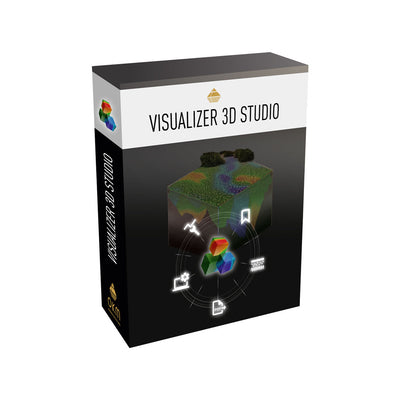
العملة المستخدمة للوظائف الذكية في Visualizer 3D Studio نقاط V3DS


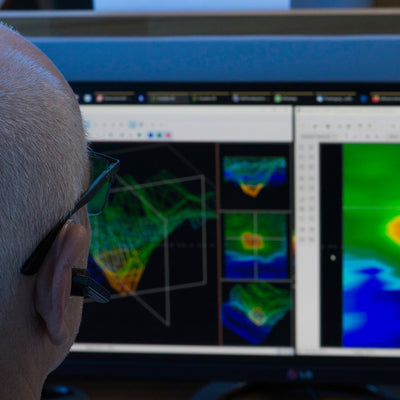
- نتائج التحليل في غضون دقائق قليلة، على مدار الساعة: لا داعي لانتظار موظف الخدمة.
- ما يصل إلى 3 عمليات مسح ضوئي في تحليل واحد: يتم تحليل المسح الضوئي الأصلي الخاص بك بالإضافة إلى عمليات المسح الضوئي المراقبة معًا – للحصول على نتائج أكثر موثوقية.
- مطور من قبل خبراء: تتولى خوارزمياتنا الخاصة عملية الكشف، بينما تضمن الذكاء الاصطناعي عرضًا سهل الفهم.
- يعمل مع جميع أجهزة الكشف من OKM: الحصص مرتبطة بمفتاح البرنامج، وليست مرتبطة بجهاز كشف معين، مما يضمن مرونة الاستخدام.
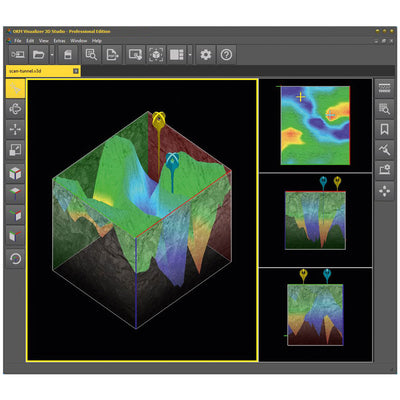
- وظائف ذكية لبرنامج Visualizer 3D Studio: تحليل المسح باستخدام الذكاء الاصطناعي. يتم تحليل ما يصل إلى 3 عمليات مسح معًا. تم تطويره بواسطة خبراء. نتائج في غضون دقائق، متاحة على مدار الساعة. لا اشتراك، ولا حدود لفترة الاستخدام.

بالإضافة إلى ضريبة القيمة المضافة وتكاليف الشحن والرسوم الجمركية










الاثنين - الجمعه 9:00 صباحا - 5:00 مساء
اللغات: عربي (AR), English (EN), Deutsch (DE)
The Currency for Smart Features in Visualizer 3D Studio
One investment, multiple benefits: Credits are exclusively redeemable within OKM's detection software Visualizer 3D Studio (V3DS) – currently for AI Scan Analysis of 3D Ground Scans, with further smart features on the way.
Built on real expertise, not just AI
The core detection logic comes from algorithms developed by OKM's own specialists – AI adds speed and readability on top.
Instead of sending your scan off and waiting for someone else to make sense of it, you get a clear answer yourself — in minutes instead of days, built on detection logic our own experts developed and made easy to understand with AI. No waiting, no guessing, no need to be an expert yourself. Here's what that means for you in practice:
AI Scan Analysis – Your Benefits at a Glance
Results in minutes, not days – anytime
The fastest way to get from scan to answer – no waiting on service team, no business hours to work around.
Up to 3 scans, evaluated together
Your original scan plus the recommended control scans, compared in one pass – for more reliable results than a single scan alone.
Built by experts, sharpened by AI
The core detection comes from algorithms developed by our own specialists. AI only makes the results easy to read – it doesn't replace the expertise.
Get better with every scan
Tips on measurement quality and improvement suggestions after every analysis. Feedback helps you spot common scan mistakes early, before your next survey.


Seamlessly built into V3DS
No data export, no switching tools – the analysis runs directly inside the software you already use.
Data quality checked upfront
An automatic pre-check flags issues before the actual analysis even begins.
Key points marked automatically
Bookmarks are set at notable spots in the scan, using algorithms developed by our detection experts.
Fewer misinterpretations
Complete and well-structured scan data helps reduce the risk of incorrect conclusions.
How AI Scan Analysis works
1. Open your Scans
Original + up to 2 control scans, as recommended.
2. Confirm the Pre-check in V3DS
Credits are redeemed automatically.
3. Get your Results
Bookmarks and improvement tips – typically within minutes.
Behind the Analysis
Scan data is first processed by algorithms developed in-house by OKM's own experts – pattern recognition, anomaly detection, bookmark placement. AI is then used to turn those results into clear, readable findings. It's a combination of expert-built engineering and AI, not AI alone.
Your data stays private
AI Scan Analysis evaluates your raw scan data only. GPS and location data are never analyzed or processed. Your find site remains your business.
AI Scan Analysis is a Support Tool – not a Guarantee
Like any evaluation, human or AI-assisted, it can make mistakes. The final assessment of the scan results and the decision to proceed with an excavation remain your responsibility.
Beyond the Scan Analysis
Consistency through multi-scan comparison
Evaluating an original scan alongside control scans improves reliability over analyzing a single scan alone – discrepancies stand out immediately.
Available 24/7
Not tied to business hours or time zones – you evaluate whenever it suits you (internet access required).


Objective and repeatable
Every scan is evaluated against the same criteria, regardless of who uploads it or when.
No guesswork for beginners
Users without experience interpreting raw data or scan images get a structured evaluation instead of a blank data sheet – lowering the barrier to using the software they already own.
V3DS Credits – An Investment that Grows with You
One Currency, many features
Credits aren't tied to a single feature. What you buy today for AI Scan Analysis also applies to future V3DS features.
No Subscription, no contract
One-time purchase, no recurring fees, nothing to cancel.
No expiry
Purchased credits stay usable, whenever you actually need them.
Pay only for what you use
No paying for a subscription, only for what's actually redeemed.
Predictable cost
The price per analysis is fixed upfront, no billing surprises.
Discount on packs
Buy more, pay less per credit, with no long-term commitment.
Works across detectors
Credits are tied to the software key, not a single OKM detector, so they stay flexible to use.
Getting started now means investing in more than just one feature.
Requirements for using V3DS credits
- Visualizer 3D Studio from version 3.4.0
- Internet access required
- Smart features are available in the Standard and Professional editions
In the Standard Edition, some functions remain limited as before – for example, PDF report creation and bookmarks are not available: e.g. AI-generated bookmarks will be set, but cannot be edited in Standard Edition. For further details please refer to the V3DS Documentation > AI Scan Analysis.